Convert PDFs into organized Word docs

Convert PDF pages into an editable Word document, so you can update text, revise content and reuse your work

Perfect for when content needs revisions, additions, or formatting changes
Rework reports and contracts without starting over
Turn locked PDFs into editable DOCX files

24/7 multilingual phone, chat
and email support | +1-844-898-1076

pdf
Upload Your Files
Drop a File to Convert
or

Everything you can do with ConvertSimpli

Do more with AI-powered file conversion

Convert and edit any type of file easily

  • Make PDF text editable for easier updates and reformatting
  • Effortlessly manage revisions and layout updates
  • Reuse agreements and proposals without retyping or reworking
  • Converts PDF tables into fully editable table grids with functional cells
A PDF being converted into an editable document

Frequently asked questions

Simple answers to your questions

How do I convert a PDF to Word?
Upload your PDF, select PDF to Word and download the converted document. Open the resulting file in Microsoft Word or a compatible word processor to review and edit it.
Can I edit the converted Word document?
Yes. The purpose of PDF to Word conversion is to create an editable document. Review the text, spacing and layout after conversion before making final changes.
Will tables convert from PDF to Word?
Many tables can convert into editable content, though complex layouts may need some cleanup. Review table alignment, cell spacing and page breaks in the Word document.
Can I convert a scanned PDF to Word?
Absolutely. Please note, a scanned PDF requires text recognition to turn the page image into editable text, so results depend on scan quality, handwriting, page clarity and the original document design.
Making formats simple
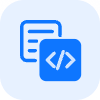
The ConvertSimpli app showing a document being converted between formats
Convert simpli tools